Best Investing Apps for Beginners 2025: 8 Platforms Ranked & Compared
I analyzed 8 investing apps for beginners on fees, minimums, and ease of use. Here's which platforms are best to get started.
1/7/202610 min read


You don't need thousands of dollars or a finance degree to begin. Many top apps let you start with just a few dollars and offer tools that explain investing in plain language. The key is finding an app that matches your comfort level and won't charge you an arm and a leg in fees.
This guide ranks the best investing apps based on how easy they are to use and what they'll actually cost you. This will help you figure out which app fits your needs so you can stop overthinking and start investing.
Key Takeaways
The best beginner investing apps offer simple interfaces and low fees so you can start building wealth without confusion
You can begin investing with just a few dollars through apps that offer fractional shares and zero-commission trades
Choosing the right app depends on matching features like educational tools and account types to your personal investing goals
What Makes an Investing App Beginner-Friendly?

A good investing app for beginners needs to be easy to navigate, teach you the basics without overwhelming you, and let you start with whatever money you have available. These three factors determine whether you'll actually stick with investing or give up after downloading your first app.
If you’re new to investing, the first mental shift is seeing money work for you. 📗Rich Dad Poor Dad is a classic primer that helps beginners think like an investor before opening their first account.
User Interface Simplicity
The best beginner apps don't look like they were designed by Wall Street traders who mainline espresso. You should be able to open the app and figure out how to buy your first stock without needing a finance degree or a tutorial that's longer than a Marvel movie.
Look for apps with clean dashboards that show your portfolio value, gains, and losses at a glance. The buy and sell buttons need to be obvious, not hidden behind three menus and a secret handshake. Good apps use plain language instead of confusing jargon like "bid-ask spreads" or "margin requirements."
Navigation should feel natural. If you're spending more time trying to find basic features than actually investing, the app isn't doing its job. The best platforms put essential tools on the home screen and use clear labels that make sense to someone who's never invested before.
Educational Resources for New Investors
Starting to invest without any guidance is like trying to bake a cake by throwing ingredients at a pan and hoping for the best. Beginner-friendly apps include learning tools that actually help instead of just overwhelming you with information.
Quality apps offer short articles, videos, or tutorials that explain investing basics in normal human language. They might cover topics like what stocks and ETFs are, how to diversify, or why you shouldn't panic when the market dips. Some platforms even provide real-time tips based on what you're looking at.
The best educational content is built into the app so you can learn as you go. You don't want to pause everything and search Google every time you see a term you don't understand. Look for apps that explain concepts right when you need them, like pop-up definitions or quick explainer cards.
Account Minimums and Accessibility
Nothing kills your investing enthusiasm faster than finding out you need $500 or $1,000 just to open an account. The most beginner-friendly apps either have no minimum deposit requirement or let you start with as little as $1.
Fractional shares make investing accessible even when you're working with small amounts. You can buy a piece of expensive stocks like Amazon or Google instead of saving up thousands for a single share. This feature lets you build a diversified portfolio with whatever money you can spare.
Zero-commission trading is now standard, but some apps still charge fees for certain transactions or account types. Check whether the app charges monthly fees, transfer fees, or costs for basic features. Free is better when you're just starting out and don't have much money to invest yet.
Ranking the Best Investing Apps for Beginners
The right investing app can make your first steps into the market feel less scary and more like a fun challenge. Some apps win on simplicity, others on price, and a few surprise you with features you didn't know you needed.
Top Choice for Ease of Use
SoFi Invest takes the crown for making investing feel like scrolling through your favorite social media app. The interface is clean, buttons are where you'd expect them, and you won't need a finance degree to understand what's happening.
You can start with as little as $5 and choose between automated investing or picking your own stocks (But, $5 is for the self picking option, chek their website for more info and automated investing amounts).
The app explains things in plain English instead of throwing complicated terms at your face. Navigation feels natural, and you'll find what you need in two taps instead of seven.
Betterment runs a close second if you prefer an app that does the heavy lifting for you. It asks you a few questions about your goals and handles the rest automatically. You don't have to stare at confusing charts or wonder if you're making terrible decisions. The setup takes about five minutes, and then you can forget about it until you're ready to check your progress.
Most Affordable Fees
You don't want your fees eating up your profits before you even get started. Robinhood charges zero commission on stock trades, zero account fees, and low transfer fees. That's a lot of zeros working in your favor.
The catch? You won't get much hand-holding or fancy research tools. But if you're comfortable doing your own homework and just want a place to buy stocks without paying for the privilege, Robinhood delivers.
Fidelity also offers commission-free trades while throwing in better research tools and educational resources. You can trade stocks, ETFs, and options for low to no fees. The account minimum is $0, so you can start with whatever amount makes sense for your budget. Fidelity makes money from other services, which means they don't need to nickel-and-dime you on basic trades.
Best Customer Support Experience
Charles Schwab wins this category by actually answering the phone when you call. Their customer service team is available 24/7, and they treat beginners like humans instead of idiots.
You can walk into a physical branch if you prefer face-to-face help. The app includes live chat support that connects you to real people who can explain things without making you feel dumb for asking. Phone wait times average under two minutes, which feels like a miracle compared to most financial companies.
Unique Features for Rookie Investors
Acorns rounds up your everyday purchases to the nearest dollar and invests the spare change automatically. Buy coffee for $3.50, and it invests 50 cents. This "set it and forget it" approach helps you build an investment habit without thinking about it.
Stash teaches you about investing as you go with bite-sized lessons and personalized guidance. The app recommends investments based on your interests and values, so you can invest in companies you actually care about. You'll learn why diversification matters and how compound interest works through quick tutorials that don't feel like homework.
M1 Finance lets you create "pies" that show exactly where your money goes visually. You can build a custom portfolio by dragging and dropping different investments into slices of your pie. The app rebalances automatically to keep your allocation on track, which saves you from doing math every month.
Understanding Fees and Costs (Without Losing Your Mind!)
Investment app fees can eat into your returns faster than you'd think. Most apps charge trading commissions, monthly subscriptions, or sneaky withdrawal fees that add up over time.
Trading Commissions Explained
Trading commissions are fees you pay each time you buy or sell a stock. The good news is that most beginner apps now offer $0 commission trades for stocks and ETFs.
Apps like Robinhood, SoFi, and Fidelity let you trade without paying a penny per transaction. This wasn't always the case, and it's a huge win for new investors.
But watch out for the fine print. Some apps charge commissions on certain trades like options contracts (usually $0.50 to $0.65 per contract) or mutual funds. Cryptocurrency trades might also come with spreads or markups that work like hidden fees.
If you're sticking to basic stock trades, you'll probably pay nothing. Just don't assume everything is free without checking first.
Subscription and Hidden Fees
Some apps charge monthly subscription fees for premium features. These usually range from $3 to $12 per month and might include research tools, advanced charts, or higher interest rates on your cash.
Apps like Robinhood Gold and Acorns charge subscriptions, while Fidelity and Schwab don't require any monthly payments at all.
Hidden fees are trickier to spot. You might pay fund expense ratios on ETFs or mutual funds, which take a small percentage of your investment each year. Look for expense ratios under 0.20% if you want to keep costs low.
Some apps also make money through payment for order flow, which means they route your trades to certain market makers. This doesn't cost you directly but can affect the price you get.
Deposit and Withdrawal Charges
Most apps let you deposit money for free using bank transfers or direct deposit. Wire transfers usually cost around $25 to $30, so skip those unless you're in a huge rush.
Withdrawal fees are less common but still exist. Standard bank transfers out are typically free, but instant transfers might cost $1.50 to $3.00 if you need your money right away.
Watch out for inactivity fees too. Some apps charge $50 to $75 per year if you don't make any trades for a while, though these are becoming rare among beginner-friendly platforms.
How to Choose the Right App for Your Investment Adventure
Finding the right investing app is like picking a workout buddy—you need someone who matches your style, won't drain your wallet, and actually shows up when you need them. Think about what you want from investing, make sure your money stays safe, and check if you'll actually use the thing on your phone or computer.
Picking Apps Based on Investment Goals
Your investment goals shape which app makes sense for you.
If you want to buy specific stocks and ETFs yourself, look for apps with zero commissions and fractional shares starting around $1. This lets you build a portfolio piece by piece without paying fees every time you buy. Apps like Fidelity offer this without charging you per trade.
Maybe you'd rather not pick stocks at all. Robo-advisors build diversified portfolios for you based on your goals and timeline. They charge an annual fee around 0.25% but handle everything automatically, including tax-loss harvesting. This works well if you want to set things up once and check in occasionally.
Some apps focus on micro-investing by rounding up your purchases and investing the spare change. These charge small monthly fees but make investing effortless. You're basically turning your coffee money into an investment account without thinking about it.
Consider whether you want educational content built in. Apps with curated stock lists and learning tools cost $3-9 monthly but guide you through the process. Others offer community features where you can see what experienced investors are doing and learn from their moves.
Security and Safety for Beginners
Your money's safety matters more than any feature list.
Check that your app is registered with the Securities and Exchange Commission and is a member of FINRA. These registrations mean the company follows rules designed to protect investors. You can verify this information on the SEC's website before signing up.
Look for SIPC protection, which covers up to $500,000 of your securities if the brokerage fails. This doesn't protect against investment losses, but it does protect your assets if the company goes under. Nearly all legitimate investing apps carry this insurance.
Key security features to verify:
Two-factor authentication for login
Biometric login options (fingerprint or face recognition)
Automatic logout after inactivity
Encryption for data transmission
Read reviews about customer service quality. When something goes wrong with your account, you need actual humans who can help. Apps with 24/7 support and multiple contact methods beat those with only email support during business hours.
Mobile App vs. Web Experience
Most people use their phones for quick checks but need computers for serious research.
Mobile apps shine for checking your portfolio, making simple trades, and getting price alerts throughout the day. The best ones load fast and let you execute trades in three taps or less. But small screens make detailed research harder, and you might miss important information squeezed into tiny text.
Web platforms offer bigger screens for comparing multiple stocks, reading full research reports, and analyzing charts. You can open several tabs to compare investments side by side. The downside is you can't trade from the grocery store line when you remember something.
Test both versions before committing money. Some apps feel smooth on mobile but clunky on desktop, or vice versa. Download the app and explore the web version using their demo features. Pay attention to whether key features live in both places or if important tools only exist on one platform.
Your trading style determines what matters most. Quick trades on the go need a solid mobile app. Deep research sessions benefit from desktop access. The ideal setup gives you full functionality in both places without making you learn two different interfaces.
Investing isn’t just tech selection — it’s habit building. 📕Your Money or Your Life pairs perfectly with any platform you choose.
Final Verdict: Pick One App and Start (Momentum Beats Perfection)
The best investing app for beginners is the one you actually use. Low fees, simple design, and beginner-friendly tools matter far more than finding the “perfect” platform.
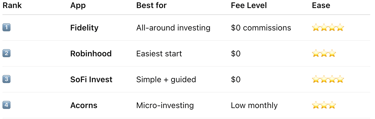
If you want a clean, all-around experience, start with SoFi or Fidelity. If automation and simplicity matter more, Betterment or Acorns can remove decision fatigue. The key is getting started, not waiting for the ideal setup.
Choose one app today, open an account, and invest your first dollar. Every month you delay is a month compound growth doesn’t work for you.
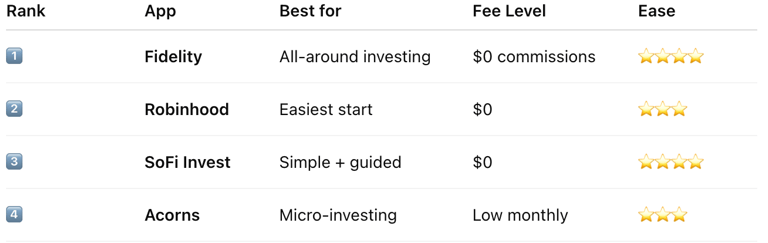
👉 Want the fastest way to start? Below are the beginner-friendly investing apps with the lowest fees and easiest setup. Compare them, pick one, and start building wealth the smart way.
Contact
kbgholston445@gmail.com
© 2025. All rights reserved.